Pokazywanie postów oznaczonych etykietą OBIEE. Pokaż wszystkie posty

środa, 10 września 2014

OBIEE date settings

http://locksnlatches.blogspot.com/2011/02/date-configuration-in-obiee.html


Working with dates in OBIEE

Here are several options to set date formats in OBIEE. Option #1 is the best way to work with dates and comparison of dates to strings containing dates in a particular format.

See also: http://gerardnico.com/wiki/dat/obiee/cast_as_date

The most important settings (with example values) are:
  • DATE_DISPLAY_FORMAT parameter in nqsconfig.ini: YYYY/MM/DD
  • DATESHORTFORMAT parameter in localedefinitions.xml (based on the locale set in nqsconfig.ini): M/D/YYYY
  • NLS_DATE_FORMAT parameter of the session (or database default): DD-MON-RR
Do not confuse these with parameters in dbfeatures.ini. There this format is the default for almost all database platforms in parameter DATE_FORMAT parameter.

środa, 18 września 2013

OBIEE Reports and Dashboards Best Practices


http://obieesagar.blogspot.com/2013/01/obiee-reports-and-dashboards-best.html


 Dashboard - Performance


Practice
Reasoning
Avoid designing dashboards that return too much data
  • Dashboards should show summary data with ability to drill into or link to detailed information with more reports.
Avoid designing requests that use overly complex queries
  • Derived metrics should be in the data source layer first, the metadata layer second, and report layer last.
Use guided navigation to link to smaller dashboards
  • Guided navigation can be set at the dashboard or at the report level.
Ensure global filters have a default value
  • Setting value to nothing or all will return all the data and impact performance.
  • Setting a default values creates a smaller data set enhancing readability.
All embedded reports on a dashboard issue their queries at dashboard load time
  • Take this into consideration when choosing to embed large reports or link to them.
  • Use multiple dashboard pages to separate large reports from each other when performance becomes an issue.

wtorek, 21 maja 2013

ERROR: runcat sawjniapi643r.dll: Can't find dependent libraries


Problem solved ;)

Client tool's installer does not provide all the required libraries, so the message: "sawjniapi643r.dll: Can't find dependent libraries".

After doing a standard OBIEE_Client_Tools installation, you have to provide the missing files.
In version 11.1.1.7.0 missing files are:
- SAWAUDITWRAPPER643R.DLL or SAWAUDITWRAPPER3R.DLL (32-bit)
- SAWFAVORITES643R.DLL or SAWFAVORITES3R.DLL (32-bit)
- SAWHEADLINEVIEW643R.DLL or SAWHEADLINEVIEW3R.DLL (32-bit)
- SAWORACOREFACADE643R.DLL or SAWORACOREFACADE3R.DLL (32-bit)
- SAWTREEMAPVIEW643R.DLL or SAWTREEMAPVIEW3R.DLL (32-bit)
- SAWTRELLISVIEW643R.DLL or SAWTRELLISVIEW3R.DLL (32-bit)
In 11.1.1.6.x there are other files missing. Nevermind

poniedziałek, 13 maja 2013

Load testing of OBIEE with JMeter


http://www.mkietzke.de/?p=44

Load testing of OBIEE

I looked for a possibility to test an OBIEE system regarding performance. Therefore I want to simulate user behavior and query reports to exeute requests. I found Apache JMeter, an open-source application for load testing. Following I describe my easy setup scenario.
First I downloaded the current Apache JMeter release 2.8 for windows. After extracting I executed \bin\jmeterw.cmd and got an application window.

poniedziałek, 22 października 2012

OBIEE Variables


Source link

OBIEE Variables

Written by  SK
    Rate this item
    (1 Vote)
    OBIEE variable types :
    ·        Repository Variables
    o   Static Variables
    o   Dynamic Variables
    ·        Session Variables
    o   System
    §  Secutity
    §  Others
    o   Non-System
    To create any variable Click Manage > Variable
    This opens variable Manager as shown below.

    REPOSITORY VARIABLE(STATIC)

    ·         Initialized only when BI server is started
    ·         Is a hard coded value like string, number , etc
    ·         Value can only be changed by logging in to the rpd file

    REPOSITORY VARIABLE(DYNAMIC)

    ·         Initialized when BI server is started
    ·         Assigned value dynamically based on the result of a query
    ·         Value is dependent of the sql provided in Initialization Block
    Create a dynamic variable and provide a Name and Default Initializer.Create a new initialization block by clicking on the New button in the above screen.
    Provide Intialization Block variable Name
    Click on “Edit Data Source” button and provide the sql to be used for the variable, e.g.
    select lower(sys_context('USERENV','SESSION_USER'))||
           '@'||
           lower(sys_context('USERENV','DB_NAME'))
      from dual;
    Provide Connection pool name. Note, a separate connection pool should be created for initialization blocks to execute te sql used for fetching data for the variable.
    Test the sql by clicking on test button.

    SESSION VARIABLE(SYSTEM)

    ·         Initialized when a Analytics web user logs (creates a new session)
    ·         Initialization depends on a Initialization block, similar to Dynamic repository Variable
    ·         Only system reserved variables can be created and the following is the list . Ones in Blue are Security related session Variables.
    Variable
    Description
    USER
    Holds the value the user enters as his or her logon name. This variable is typically populated from the LDAP profile of the user.
    PROXY
    Holds the name of the proxy user. A proxy user is a user that has been authorized to act for another user.
    GROUP
    Contains the groups to which the user belongs. Exists only for compatibility with previous releases. Legacy groups are mapped to application roles automatically.
    WEBGROUPS
    Specifies the Catalog groups (Presentation Services groups) to which the user belongs, if any. Note that the recommended practice is to use application roles rather than Catalog groups.
    USERGUID
    Contains the global unique identifier (GUID) of the user, typically populated from the LDAP profile of the user.
    ROLES
    Contains the application roles to which the user belongs.
    ROLEGUIDS
    Contains the global unique identifiers (GUIDs) for the application roles to which the user belongs. GUIDs for application roles are the same as the application role names.
    PERMISSIONS
    Contains the permissions held by the user, such as oracle.bi.server.impersonateUser or oracle.bi.server.manageRepository.
    DISPLAYNAME
    Used for Oracle BI Presentation Services. It contains the name that is displayed to the user in the greeting in the Oracle BI Presentation Services user interface. It is also saved as the author field for catalog objects. This variable is typically populated from the LDAP profile of the user.
    PORTALPATH
    Used for Oracle BI Presentation Services. It identifies the default dashboard the user sees when logging in (the user can override this preference after logged on).
    LOGLEVEL
    The value of LOGLEVEL (a number between 0 and 5) determines the logging level that the Oracle BI Server uses for user queries.
    This system session variable overrides a variable defined in the Users object in the Administration Tool. If the administrator user (defined upon install) has a Logging level defined as 4 and the session variable 
    LOGLEVEL defined in the repository has a value of 0 (zero), the value of 0 applies.
    REQUESTKEY
    Used for Oracle BI Presentation Services. Any users with the same nonblank request key share the same Oracle BI Presentation Services cache entries. This tells Oracle BI Presentation Services that these users have identical content filters and security in the Oracle BI Server. Sharing Oracle BI Presentation Services cache entries is a way to minimize unnecessary communication with the Oracle BI Server.
    SKIN
    Determines certain elements of the look and feel of the Oracle BI Presentation Services user interface. The user can alter some elements of the user interface by picking a style when logged on to Oracle BI Presentation Services. The SKIN variable points to an Oracle BI Presentation Services folder that contains the nonalterable elements (for example, figures such as GIF files). Such directories begin with sk_. For example, if a folder were called sk_companyx, the SKIN variable would be set to companyx.
    DESCRIPTION
    Contains a description of the user, typically populated from the LDAP profile of the user.
    USERLOCALE
    Contains the locale of the user, typically populated from the LDAP profile of the user.
    DISABLE_CACHE_HIT
    Used to enable or disable Oracle BI Server result cache hits. This variable has a possible value of 0 or 1.
    DISABLE_CACHE_SEED
    Used to enable or disable Oracle BI Server result cache seeding. This variable has a possible value of 0 or 1.
    DISABLE_SUBREQUEST_CACHE
    Used to enable or disable Oracle BI Server subrequest cache hits and seeding. This variable has a possible value of 0 or 1.
    SELECT_PHYSICAL
    Identifies the query as a SELECT_PHYSICAL query..
    DISABLE_PLAN_CACHE_HIT
    Used to enable or disable Oracle BI Server plan cache hits. This variable has a possible value of 0 or 1.
    DISABLE_PLAN_CACHE_SEED
    Used to enable or disable Oracle BI Server plan cache seeding. This variable has a possible value of 0 or 1.
    TIMEZONE
    Contains the time zone of the user, typically populated from the LDAP profile of the user.

    SESSION VARIABLE(NON-SESSION)

    ·         Initialized when a Analytics web user logs (creates a new session)
    ·         Initialization depends on a Initialization block, similar to Dynamic repository Variable

    ROW WISE INITIALIZATION OF VARIABLES

    If a variable is marked for row wise initialization it means it returns an array of values. Below are the steps. E.g. if we want a variable to store last 10 years here is how we create it :
    Create a variable and click on New  to create  new initialization block
    Provide a name for the initialization block and click “Edit Data Source”
    Provide a sql that returns multiple values. Set connection pool and Test the sql. Save this and exit the “Variable Manager”
    Reopen the “Variable Manager” and open the initialization block. Next click on the “Edit Data Target”.
    Select the variable and check “Row wise initialization” and say OK.

    On the Initialization block page click Test  to check tat the Variable ARRAY  is initialized and returns values.
     Access method for Variable types
     "If you found this article useful, please rate the same"

    piątek, 12 października 2012

    Migration of the Security Stores – OBIEE11g


    In my recent up-gradation projects after doing the Up-gradation in Dev Environment it is a obvious question that how I get my security setup migrated to say Test environment . One easy way to do this is just up-grade your Test env and during the up-grade process your user/group list will be automatically updated to the security store of 11g and will be automatically done by Upgrade assistant behind the scene. However this is a work around but this process is not the Oracle suggested method for security policy store migration.
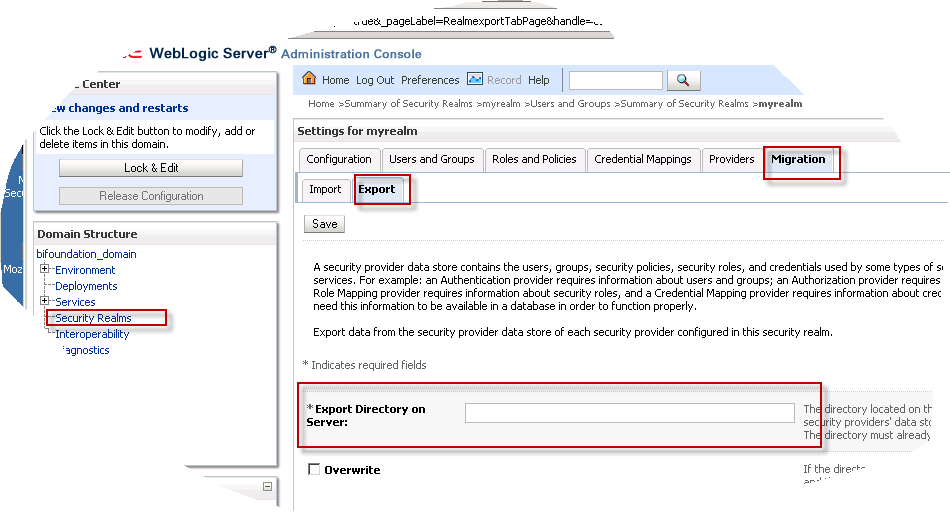
    The actual process to do this is using the Migration assistant under Security realm of  Weblogic Console. See below image . Go to Export tab and put any directory name where you want the exported copy like : D:\Share\Security …
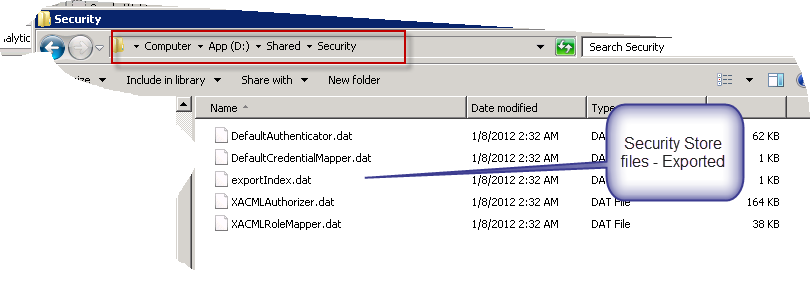
    The .dat file list would be like below:
    Now once you get this list click on Import button of the target environment (say. Test) and simply click the update button . You will see all list of users and groups will be automatically migrated from Dev to Test .

    OBIEE 11g – orthodox De-install Process

    Link


    Most of the common question is how to Install OBIEE 11g(11.1.1.5) but a bit un-common question is how to De-install until and unless you are facing problem with current installation process . Here are the steps at high level (not screenshot by screenshot) which will perform the orthodox De-install process. As the selection is quite straightforward hence I am skipping the screenshot’s part. There are several blog where you can find the screenshot to help you out.
    Briefly, I had the full installation with Weblogic , RCU , Oracle in some path in Windows Server(2008,R2, 64 bit) and after De-installation I want to continue using the same path so all the De-install process should be very clean so that it will not leave any footprints of previous installation in any of the places for a successful installation once again.
    Here you go …
    • Stop all running processes for Admin and Managed servers including BI components services. Stop all the processes, if any, created during service process creation for e.g. Windows Process.
    • Remove the Weblogic Server using the Un-installation wizard under Control Panel.
    • Perform De-install from Oracle Business Intelligence -) De-install option of Program menu
    • Drop the RCU schemas using the RCU batch file -) Drop option
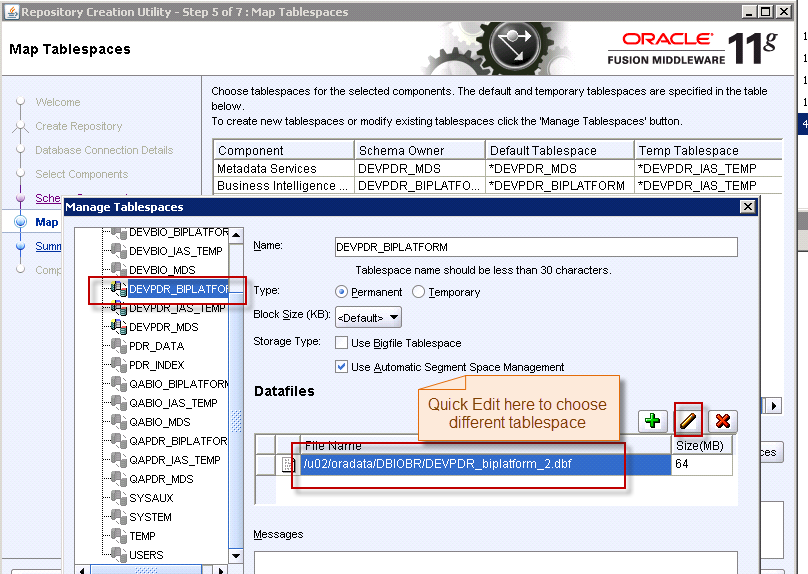
    • Manually remove the RCU Tablespace DBF file (to have a clean new RCU schema) . In my case I didn’t remove the DBF file as the Database server is under DBA’s control .Hence, to be safer side I re-create the RCU during the fresh installation process under different tablespace. This will make sure nothing is going to messed up with your previous installation … See below image:

    • De-install Middleware Oracle home (traverse to ..\[MIDDLEWARE_HOME]\Oracle_BI\oui\bin\ and execute below from command line: setup.exe -deinstall)
    • De-install the Middleware common Oracle Home  (traverse to ..\[MIDDLEWARE_HOME]\oracle_common\oui\bin\ and execute below from command line: setup.exe -deinstall –jreLoc  ..\[MIDDLEWARE_HOME]\Oracle_BI1\jdk)
    • Remove the Middleware Home directory with all contents forcefully,if reqd.
    • Remove the environment variable pointing to earlier locations and the relevant paths if any. This is Important!
    • Re-boot the entire server.
    • Delete the Oracle common keys , if any, from registry. This is Important ! Most of the common problem lies here . So in my case I follow the process of finding my Middleware Home path from Registry and delete all relevant Keys and values . Be careful while playing with registry :)
    • Remove the windows service process key from registry , if any
    • As in my case I don’t need to De-install my Oracle Client/DB Home hence I skip the process as I going to re-use the same Oracle Home in the next installation time.So if you are going to do the same probably you can skip De-installing your Oracle Client/DB home.

    środa, 11 kwietnia 2012

    obiee Firefox 10 - FIX

    Link
    http://frankschmidt.blogspot.com/2012/02/obiee-firefox-10-obiee-11115.html

    1. type "about:config" into an address bar
    2. right click anywhere and choose New / String
    3. name it "general.useragent.override"
    4. put the value "Mozilla/5.0 (Windows; Windows NT 6.1; rv:10.0)Gecko/20100101 Firefox/9.0"
    5. refresh OBIEE login screen

    środa, 4 kwietnia 2012

    OBIEE Presentation Services start ERROR

    LINK
    ------------------------------------------------------------------
    댓글: 7 - 페이지: 1 - 마지막 글: 2009-04-20 14:33 최종 작성자: user3318060
    625466

    글: 4
    등록일: 08-03-14
    The Oracle BI Presentation Server service terminated with service-specific
    게시일: 2008-03-19 02:44
    댓글
    Hi All,

    I have installed OBIEE on my machine and when trying to start the Presentation server i got the following error message in my system log .
    The Oracle BI Presentation Server service terminated with service-specific error 4294967295 (0xFFFFFFFF).

    On looking at the sawlog0.log found the following error as the root cause :

    Type: Error
    Severity: 10
    Time: Wed Mar 19 14:31:16 2008
    File: project/webcatalog/catalogimpl.cpp Line: 734
    Properties: ThreadID-4800
    Location:
    saw.sqlNodeCacheMgr.loadCatalog
    saw.webextensionbase.init
    saw.sawserver
    saw.sawserver.initializesawserver
    saw.threads

    Invalid item \\?\C:\OracleBIData\web\catalog\EPMMaster\root\system\mktgcache\siddsing-lap\sawguidstate.atr.
    Type: Error
    Severity: 10
    Time: Wed Mar 19 14:31:16 2008
    File: project/webcatalog/catalogimpl.cpp Line: 734
    Properties: ThreadID-4800
    Location:
    saw.webextensionbase.init
    saw.sawserver
    saw.sawserver.initializesawserver
    saw.threads

    Invalid item \\?\C:\OracleBIData\web\catalog\EPMMaster\root\system\mktgcache\siddsing-lap\sawguidstate.atr.
    Type: Error
    Severity: 10
    Time: Wed Mar 19 14:31:16 2008
    File: project/webcatalog/catalogimpl.cpp Line: 379
    Properties: ThreadID-4800
    Location:
    saw.webextensionbase.init
    saw.sawserver
    saw.sawserver.initializesawserver
    saw.threads

    Invalid item /system/mktgcache/SIDDSING-lap/sawguidstate.
    Type: Error
    Severity: 20
    Time: Wed Mar 19 14:31:16 2008
    File: project/sawserver/winmain.cpp Line: 74
    Properties: ThreadID-4800
    Location:
    saw.sawserver.initializesawserver
    saw.threads

    Invalid item /system/mktgcache/SIDDSING-lap/sawguidstate.
    Type: Error
    Severity: 30
    Time: Wed Mar 19 14:31:16 2008
    File: project/webcomm/rpcserver.cpp Line: 145
    Properties:
    Location:
    saw.unknown

    Assertion failure: m_pImpl != 0 at line 145 of ./project/webcomm/rpcserver.cpp
    Can you help me with this and let me know what might be causing this error .
    I have checked the configuration files and the paths are set correctly too .

    Thanks,
    Sid
    Christian Berg

    글: 1,386
    등록일: 08-01-11
    Re: The Oracle BI Presentation Server service terminated with service-specific
    게시일: 2008-03-19 03:14 625466님의 질문에 답변
    댓글
    Looks like your webcat is corrupt / not in the correct place.

    From your log:
    "Invalid item \\?\C:\OracleBIData\web\catalog\EPMMaster\root\system\mktgcache\siddsing-lap\sawguidstate.atr."
    625466

    글: 4
    등록일: 08-03-14
    Re: The Oracle BI Presentation Server service terminated with service-specific
    게시일: 2008-03-19 07:06 Christian Berg님의 질문에 답변
    댓글
    I got the point and tried making some changes to the webcatalog and the instanceconfig file ....the sad part is that now i am facing a diff error

    Type: Information
    Severity: 30
    Time: Wed Mar 19 19:34:07 2008
    File: project/sawserver/sawserver.cpp Line: 348
    Properties: ThreadID-2576
    Location:
    saw.sawserver
    saw.sawserver.initializesawserver
    saw.threads

    Oracle BI Presentation Services 10.1.3.2.1 (Build 070411.1900) are starting up.
    Type: Warning
    Severity: 30
    Time: Wed Mar 19 19:34:07 2008
    File: project/websubsystems/webextensionbase.cpp Line: 356
    Properties: ThreadID-2576
    Location:
    saw.webextensionbase.init.workstationCheck
    saw.webextensionbase.init
    saw.sawserver
    saw.sawserver.initializesawserver
    saw.threads

    WARNING: The Oracle BI Presentation Server is running on a workstation class machine (Windows 2000 Workstation, Windows XP Professional, etc.). Number of concurrent users may be severely limited by the operating system.
    Type: Error
    Severity: 42
    Time: Wed Mar 19 19:34:07 2008
    File: project/websecurity/securitymanager.cpp Line: 99
    Properties: ThreadID-2576
    Location:
    saw.catalog.local.loadCatalog
    saw.webextensionbase.init
    saw.sawserver
    saw.sawserver.initializesawserver
    saw.threads

    Error loading security privilege /system/privs/catalog/ChangePermissionsPrivilege.
    Type: Error
    Severity: 20
    Time: Wed Mar 19 19:34:07 2008
    File: project/sawserver/winmain.cpp Line: 74
    Properties: ThreadID-2576
    Location:
    saw.sawserver.initializesawserver
    saw.threads

    Error loading security privilege /system/privs/catalog/ChangePermissionsPrivilege.
    Type: Error
    Severity: 30
    Time: Wed Mar 19 19:34:07 2008
    File: project/webcomm/rpcserver.cpp Line: 145
    Properties:
    Location:
    saw.unknown

    Assertion failure: m_pImpl != 0 at line 145 of ./project/webcomm/rpcserver.cpp
    Any suggestions ???
    Christian Berg

    글: 1,386
    등록일: 08-01-11
    Re: The Oracle BI Presentation Server service terminated with service-specific
    게시일: 2008-03-19 08:08 625466님의 질문에 답변
    댓글
    Yes. Stop the server, rename your web catalog and start the server again. See whether it come sup correctly and creates the blank web catalog as it should.
    Basically, your web catalog seem sto be corrupt.
    SShah

    글: 8
    등록일: 08-04-07
    Re: The Oracle BI Presentation Server service terminated with service-specific
    게시일: 2008-04-07 13:15 625466님의 질문에 답변
    댓글
    Are you trying to set Impersonator
    user507530

    글: 47
    등록일: 06-05-03
    Re: The Oracle BI Presentation Server service terminated with service-specific
    게시일: 2008-10-21 07:03 625466님의 질문에 답변
    댓글
    I had restore my system registry and I stared facing this problem. And at the same time I had use initial blocks and session variable to set the default portal path.

    I am not sure what was the exact cause of catelog correctption from above two or both?
    Feedback will be appreciated.

    The good news is:
    Renaming the web catelog has solved the problem.

    Thanks all for help..
    nimish

    글: 18
    등록일: 08-01-06
    Re: The Oracle BI Presentation Server service terminated with service-specific
    게시일: 2009-02-11 14:50 user507530님의 질문에 답변
    댓글
    This happened to me when my machine's ip address changed, although it shouldn't. I had to replace the nshah sawguidstate and sawguidstate.atr files in the C:\OracleBIData\web\catalog\\root\system\mktgcache\ folder with the same files from another working installation. Before replacing the files, make sure all OBIEE services are shut down, after replacing the files and restarting the services, the problem disappeared for me.
    user3318060

    글: 4
    등록일: 09-04-20
    Re: The Oracle BI Presentation Server service terminated with service-specific
    게시일: 2009-04-20 14:33 625466님의 질문에 답변
    댓글
    I had the same issue previously. Try this...

    1. Stop BI Server Service > Start BI Server Service > Start BI Presentation Service. If that doesn't work...
    2. Restart machine and follow step 1. If that doesn't work...
    3. Check instantconfig.ini file and check syntax is correct. Also check java directory path mentioned is the valid one. If that doesn't work...
    4. Rename the catalog folder to something else and follow step 1. It will create new catalog folder. Then copy _Shared from old catalog folder and you are good to go.

    Hope this will help.

    Ginekolog dr n. med. Piotr Siwek

    Gabinet ginekologiczny specjalista ginekolog - położnik dr n. med. Piotr Siwek